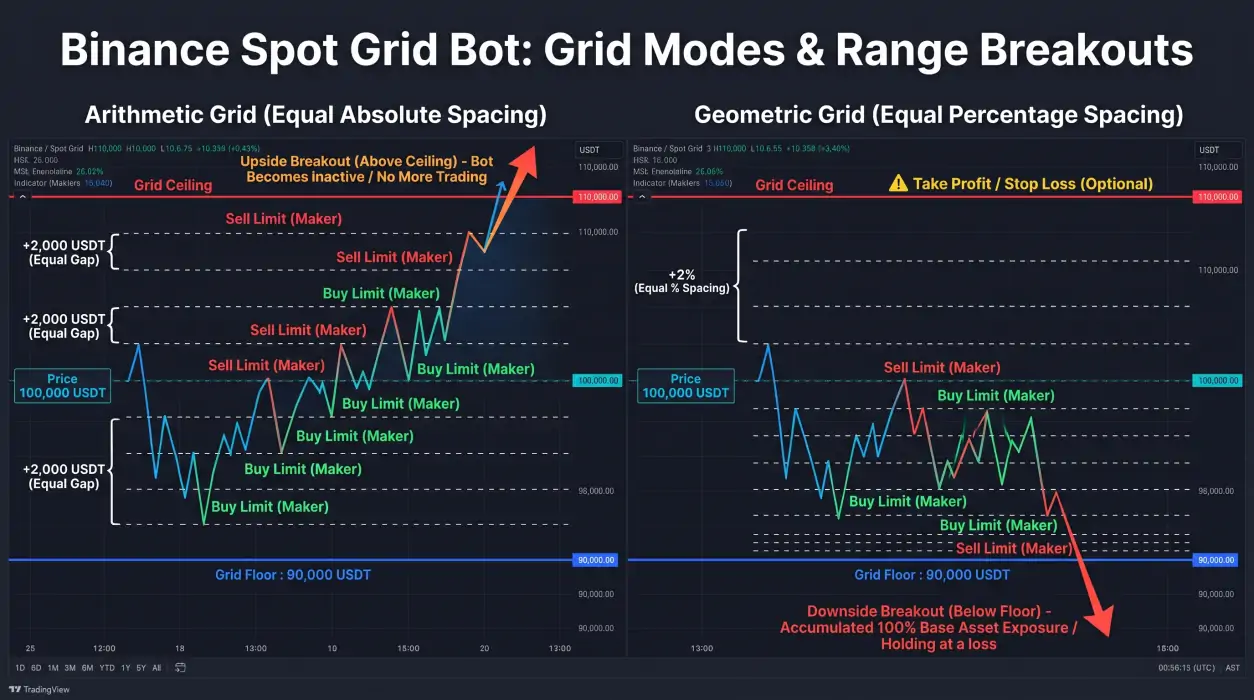
A Binance Spot Grid bot automates buying and selling across a predefined price range using a ladder of LIMIT orders. Before it starts trading, the bot must allocate capital between the base asset and quote asset so it can place sell orders above the current price and buy orders below it. The main challenge is choosing grid settings that account for initial asset allocation, trading fees, available capital, and adverse price movements.
This guide explains how to configure a spot grid strategy using Prime Trading Bot and how to evaluate its limitations before deploying it on Binance Spot.
How Spot Grid Trading Works
A spot grid strategy divides a selected price range into multiple levels.
The bot places buy orders below the current price and sell orders above it. When a buy order fills, the bot places a sell order one grid step higher. When a sell order fills, the bot places a buy order one step lower.
The process repeats as price moves between grid levels.
Unlike a DCA strategy, a grid does not depend on a single entry signal to begin its trading cycle. It establishes a structure of orders across a selected range.
The distinction between these approaches is explained in Spot DCA vs. Spot Grid: Choosing a Binance Bot Strategy.
A grid strategy is designed to trade volatility rather than predict market direction. However, it is long-biased and can accumulate the base asset during a sustained decline.
Step 1: Understand Initial Base Asset and Quote Asset Allocation
One of the most important Binance grid bot settings is the initial allocation between the base asset and quote asset.
For a BTC/USDT grid:
- Base asset: BTC
- Quote asset: USDT
When the bot starts at a price between the grid floor and ceiling, it needs BTC to place sell orders above the current price and USDT to place buy orders below it.
Why the bot needs an initial base-asset allocation
The sell orders above the current price represent BTC that the bot must already hold or acquire.
Prime Trading Bot's Spot Grid model uses an initial market purchase of the base asset to fund the sell side of the grid.
This means a trader should not assume that depositing 100% USDT is sufficient to operate the complete grid without an initial base-asset purchase.
The initial purchase is part of the grid's setup and changes the portfolio allocation immediately.
Example: Initial allocation for a BTC/USDT grid
Consider a hypothetical configuration:
- Current BTC price: 100,000 USDT
- Grid floor: 90,000 USDT
- Grid ceiling: 110,000 USDT
- Total planned capital: 2,000 USDT
The capital must support both sides of the grid.
| Allocation | Purpose |
|---|---|
| BTC | Funds sell orders above the current price |
| USDT | Funds buy orders below the current price |
| Initial market purchase | Acquires BTC needed for the sell side |
| Remaining quote balance | Supports buy orders and future grid activity |
The exact initial Base Asset vs. Quote Asset ratio depends on the grid configuration and its order distribution.
What happens to a 100% USDT deposit?
If the grid requires BTC for its sell orders, the bot must acquire that BTC before those orders can be placed.
The initial market purchase may execute at a different price from the displayed price due to market conditions and execution costs.
This creates an immediate change in asset exposure.
Traders should account for this initial purchase when calculating capital requirements and evaluating the grid's starting portfolio value.
Step 2: Choose the Grid Price Range
The price range defines the upper and lower boundaries of the strategy.
Prime Trading Bot supports manual and automatic range selection.
| Range method | How it works | Main consideration |
|---|---|---|
| Manual | Trader specifies the ceiling and floor | Requires deliberate range selection |
| Recent High/Low | Uses recent price extremes | Historical boundaries may not remain relevant |
| Bollinger Bands | Uses volatility bands | Price can move beyond the bands |
| ATR | Uses average true range | Range depends on the volatility measurement |
Automatic ranges are calculated at the start. They should not be treated as continuously updated predictions of future price boundaries.
Setting the ceiling and floor
The ceiling is the highest price level in the grid. The floor is the lowest.
For example, a hypothetical BTC/USDT grid could use:
- Ceiling: 110,000 USDT
- Floor: 90,000 USDT
- Current price: 100,000 USDT
This creates a range around the current market price.
The example is illustrative and does not represent a current market recommendation.
A range that is too narrow may be crossed frequently, but it can also leave the bot inactive when price moves outside its boundaries.
A wider range provides more room for price movement but requires different grid spacing and capital allocation.
Step 3: Choose Arithmetic or Geometric Grid Spacing
Prime Trading Bot supports two grid modes: arithmetic and geometric.
The difference determines how price levels are distributed across the selected range.
Arithmetic grid
An arithmetic grid uses equal absolute price differences between consecutive levels.
For example, a range from 90,000 to 110,000 USDT with 20 intervals would have a price difference of 1,000 USDT between levels.
This produces equal price increments across the range.
Arithmetic grids are suited to relatively tight and stable ranges.
Geometric grid
A geometric grid uses equal percentage differences between consecutive levels.
The absolute price difference increases as the price level rises.
This produces equal percentage spacing across the range.
Geometric grids are suited to wider or more volatile ranges. Prime Trading Bot's documentation strongly recommends geometric spacing when the ceiling and floor differ by more than 30%.
Arithmetic vs. geometric grid comparison
| Characteristic | Arithmetic | Geometric |
|---|---|---|
| Price difference | Equal | Changes with price |
| Percentage difference | Changes with price | Equal |
| Typical application | Tighter, stable ranges | Wider, volatile ranges |
| Main consideration | Percentage spacing varies | Absolute spacing varies |
Neither mode is inherently more profitable. The appropriate choice depends on the range, market conditions, and trading costs.
Step 4: Select the Grid Count
Grid count determines how many intervals divide the selected range.
A higher count creates more price levels and smaller spacing between them. A lower count creates fewer levels and wider spacing.
Prime Trading Bot's documentation identifies 20–80 grids as a sensible range for typical configurations.
Grid counts above approximately 150 can encounter Binance API rate limits.
Grid count and order size
The number of grids also affects capital allocation.
For example, suppose a hypothetical strategy allocates 2,000 USDT across 40 grid intervals.
A simple allocation estimate is:
\[ \text{Capital per grid} = \frac{\text{Total capital}}{\text{Grid count}} \]
\[ \frac{2,000}{40}=50\text{ USDT} \]
This is a simplified planning estimate. Actual allocation depends on the grid structure, initial base-asset holdings, quote-asset holdings, and exchange order requirements.
Each order must satisfy Binance's minimum order size, documented by the bot as approximately 5 USDT.
A configuration with too many grids relative to its capital may produce orders below the minimum.
Step 5: Calculate Spot Grid Bot Profit per Grid
Spot grid bot profit calculation begins with the difference between the buy price and sell price of a completed grid cycle.
For a single completed grid step (buy low, sell high):
\[ \text{Gross Profit} = Q \cdot (P_{\text{sell}} - P_{\text{buy}}) \]
Where:
- \(P_{\text{sell}}\) is the executed sell price at the upper grid level.
- \(P_{\text{buy}}\) is the executed buy price at the lower grid level.
- \(Q\) is the order quantity filled.
However, gross profit does not account for exchange trading fees incurred across both transactions.
Net profit per completed grid cycle
A spot grid cycle incurs fees on both the buy order and the sell order. When accounting for two-way trading fees:
\[ \text{Net Profit}_{\text{cycle}} = Q \cdot \left[ P_{\text{sell}} \cdot (1 - f_{\text{sell}}) - P_{\text{buy}} \cdot (1 + f_{\text{buy}}) \right] \]
Where:
- \(f_{\text{buy}}\) is the fee rate on the buy order (e.g., 0.1% or 0.001).
- \(f_{\text{sell}}\) is the fee rate on the sell order (e.g., 0.1% or 0.001, reduced if using BNB fee deduction).
To ensure that each grid interval yields a positive net return, the minimum price spread between consecutive grid levels must satisfy:
\[ \frac{P_{\text{sell}} - P_{\text{buy}}}{P_{\text{buy}}} > \frac{f_{\text{buy}} + f_{\text{sell}}}{1 - f_{\text{sell}}} \approx f_{\text{buy}} + f_{\text{sell}} \]
Realized profit vs. total net strategy profit
Traders must distinguish between realized grid profits and the overall net equity of the running bot:
\[ \text{Total Net Strategy Profit} = \sum \text{Net Profit}_{\text{cycle}} + \text{Unrealized PnL} - \text{Additional Slippage/Fees} \]
Where unrealized PnL reflects the floating gain or loss on the base asset currently held by the bot:
\[ \text{Unrealized PnL} = Q_{\text{held}} \cdot (P_{\text{current}} - P_{\text{avg}}) \]
This calculation explains why a bot can report dozens of profitable completed grid cycles while the overall portfolio value temporarily declines during an extended market downturn.
Why grid spacing must exceed trading costs
Prime Trading Bot's documentation states that profit per grid step must comfortably exceed Binance's trading fee structure.
A narrow grid may generate frequent order activity while leaving little room between buy and sell prices after fees.
Before selecting grid spacing, review:
- The expected price difference between consecutive levels.
- The buy-side trading fee (maker vs. taker).
- The sell-side trading fee.
- BNB fee discount availability (25% spot discount).
- The effect of partial fills and changing market conditions.
Grid orders rest on the exchange book, so maker fees are typical. However, orders that execute against existing liquidity may incur taker fees. A configuration should never be evaluated using gross price differences alone.
Why grid spacing must exceed trading costs
Prime Trading Bot's documentation states that profit per grid step must exceed Binance's 0.1% fee.
A narrow grid may generate frequent order activity while leaving little room between buy and sell prices after fees.
Before selecting grid spacing, review:
- The expected price difference between consecutive levels.
- The buy-side trading fee.
- The sell-side trading fee.
- Whether orders are likely to execute as maker or taker.
- The effect of partial fills and changing market conditions.
Grid orders rest on the exchange book, so maker fees may be possible.
Maker execution is not guaranteed. Orders that execute against existing liquidity may incur taker fees.
A configuration should not be evaluated using gross price differences alone.
Step 6: Configure the Grid Trigger
Prime Trading Bot supports several grid activation methods.
| Trigger | Description |
|---|---|
| Start immediately | Activates the grid without waiting for a price condition |
| Fixed price | Waits for a specified price |
| EMA cross | Waits for a configured exponential moving average crossover |
The trigger determines when the strategy begins placing orders.
A grid that starts immediately may establish its range around current market conditions. A fixed-price or EMA-based trigger delays activation until the configured condition is met.
The trigger does not guarantee that the selected range will remain suitable after activation.
Step 7: Understand Spot Grid Trailing Up and Down
A grid configuration needs a plan for breakouts and sustained declines.
Price falls below the floor
By default, the grid holds the accumulated coins at a loss until price recovers.
If the market continues declining, the strategy can become increasingly exposed to the falling asset.
The bot supports additional options:
- Trailing Down: Moves the grid downward to follow falling prices.
- DCA Safety Net: Adds extra purchases below the floor and attempts to sell the accumulated position on a bounce.
The DCA Safety Net uses martingale-style sizing and introduces additional risk.
It should not be treated as a substitute for a defined capital allocation or downside plan.
Price rises above the ceiling
Above the ceiling, the grid stops trading the upside.
The Sliding Grid feature, also known as Infinity Grid, shifts the grid upward after a breakout.
This is commonly described as grid trailing up.
It changes the grid's operating range, but it does not guarantee continued trading at favorable prices.
Configure equity-based risk controls
Prime Trading Bot supports Equity Take Profit and Equity Stop Loss.
These controls evaluate total grid equity, including USDT and the current value of held coins.
When a configured threshold is reached, the bot cancels orders, market-sells the base asset, and stops the pair.
Equity-based controls are important because the grid's total exposure includes both open orders and accumulated assets.
Step 8: Test Before Live Trading
Prime Trading Bot supports grid backtesting and Paper Trading.
Backtesting can help compare configurations under historical market conditions.
Paper Trading simulates fills using live Binance prices.
Neither method guarantees that live execution will match the simulation.
A practical testing process is:
- Define the intended market conditions.
- Select a price range and grid mode.
- Choose a grid count that satisfies capital and order-size requirements.
- Calculate initial Base Asset and Quote Asset allocation.
- Account for trading fees.
- Evaluate behavior below the floor and above the ceiling.
- Test the configuration using historical data.
- Observe simulated execution before considering live trading.
For detailed instructions, review the Spot Grid backtesting guide.
Using Prime Trading Bot for Binance Spot Grid Trading
Prime Trading Bot provides self-hosted Spot Grid software for Binance.
The Spot Grid Bot supports manual and automatic ranges, arithmetic and geometric spacing, configurable triggers, and additional range-management features.
The software runs on the trader's own Windows or Linux server. It uses Binance Spot API access and does not require withdrawal permission.
Before configuring a live strategy, review the Grid user guide and the Grid strategy documentation.
The bot automates configured rules. It does not predict future price movements or eliminate market risk.
Frequently Asked Questions
What is the best grid spacing percentage?
There is no universally best grid spacing percentage.
The appropriate spacing depends on the selected range, grid mode, market volatility, trading fees, and order size.
A configuration should account for both the expected price difference between consecutive levels and the total cost of completing a buy-and-sell cycle.
Can I start a Binance Spot Grid bot with 100% USDT?
A grid that requires sell orders above the current price needs the base asset to fund those orders.
Prime Trading Bot's Spot Grid model uses an initial market purchase of the base asset to fund the sell side.
A 100% USDT deposit should therefore not be assumed to operate the complete grid without an initial base-asset purchase.
The exact initial asset allocation depends on the configured grid.
What happens if price falls below the grid floor?
By default, the grid holds the accumulated coins at a loss until price recovers.
The bot can use Trailing Down or DCA Safety Net options, but these introduce different trading behavior and risk.
A sustained decline can leave the strategy holding an asset whose market value continues falling.
What happens if price rises above the grid ceiling?
The grid stops trading the upside when price moves above its ceiling.
Sliding Grid can shift the grid upward after a breakout, allowing it to follow rising prices.
This does not guarantee that the new range will remain suitable.
Is arithmetic or geometric grid better?
Arithmetic grids use equal absolute price differences, while geometric grids use equal percentage differences.
Arithmetic grids are suited to tighter, relatively stable ranges. Geometric grids are suited to wider or more volatile ranges.
The appropriate choice depends on the selected range and strategy assumptions.
Does grid profit include the value of held coins?
Grid equity includes USDT in the grid and the current value of held coins.
Equity-based take-profit and stop-loss controls use this total grid equity rather than evaluating completed grid cycles alone.
A strategy can have completed profitable cycles while still holding an asset at an unrealized loss.
Key takeaways
- A Binance Spot Grid bot requires both base and quote assets to operate its sell and buy sides.
- The initial market purchase of the base asset is part of the grid's setup and should be included in capital planning.
- Arithmetic grids use equal price differences; geometric grids use equal percentage differences.
- Grid spacing must account for trading fees and execution conditions.
- Sliding Grid and Trailing Down change how the bot responds to price moving outside its range.
- Backtesting and Paper Trading help evaluate configurations but do not guarantee future results.