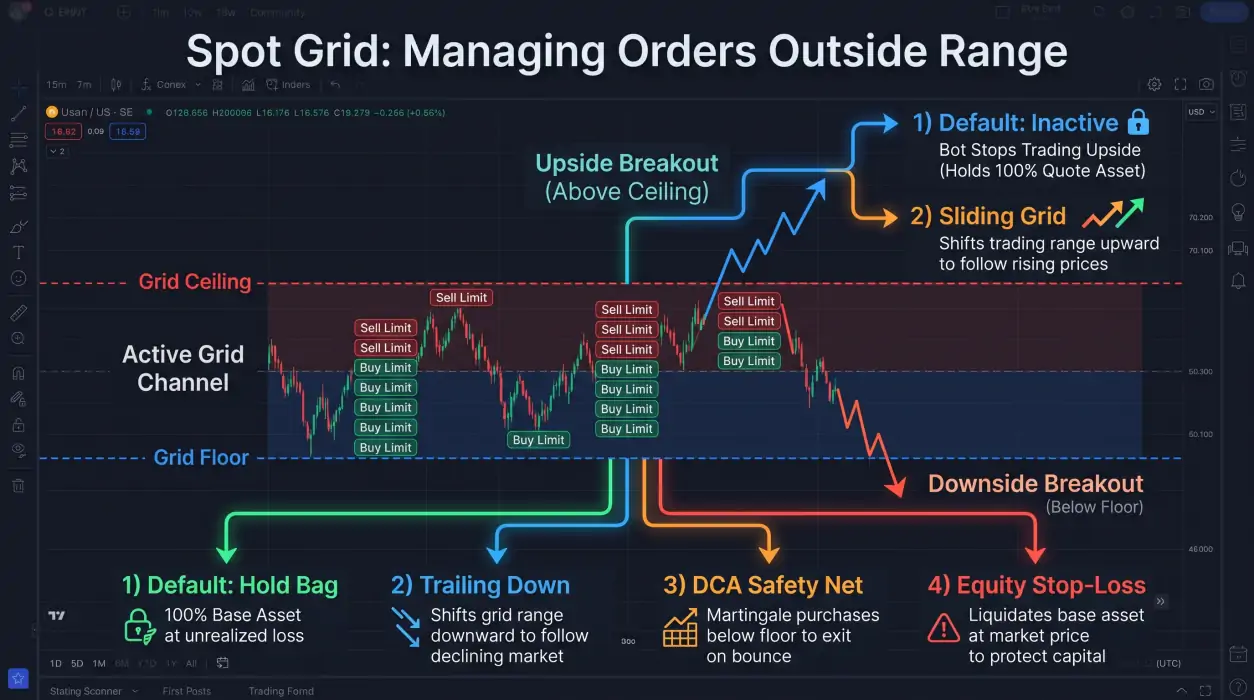
A spot grid bot can stop placing new trades when the market moves outside its configured price range. What happens next depends on whether price breaks below the floor or above the ceiling—and which controls you enabled before starting the bot.
The key is to plan for both outcomes. A grid is not a neutral strategy: it holds the base asset and can accumulate more during declines, while a strong move above the ceiling can leave it underexposed to further upside.
What happens when price leaves a spot grid range?
A Binance Spot Grid places buy and sell limit orders at predefined price levels. When a buy order fills, the bot places a sell order one grid step above it. When a sell fills, it places a buy one step below.
That cycle assumes price remains inside the configured range.
| Price movement | Default behavior | Main concern |
|---|---|---|
| Price falls below the floor | Grid orders below the range are no longer available to continue the normal cycle | The bot may hold base asset while its value declines |
| Price rises above the ceiling | Grid orders above the range are exhausted | The bot may stop trading and miss further upside |
| Price stays inside the range | Buy and sell orders can continue cycling | Fees and grid spacing affect whether each completed step is worthwhile |
The default behavior below the floor is often described as bag holding: the bot retains coins that have declined in value and waits for a recovery. That is not a guaranteed recovery plan.
Before launch: define the range and allocation
A grid’s behavior outside its range is partly determined by the setup choices made before the first order.
Set the floor and ceiling deliberately
The floor is the lower boundary of the grid; the ceiling is the upper boundary. A range that is too narrow can be exited by ordinary volatility. A range that is too wide may produce fewer completed grid cycles.
Prime Trading Bot’s Spot Grid supports manual ranges and Auto Range options based on Recent High/Low, Bollinger Bands, or ATR. Auto Range calculations are made when the bot starts, so they do not guarantee that the range will remain appropriate later.
For a manual range, consider:
- The price area where you are willing to hold the base asset.
- Whether the market has been moving sideways or trending.
- How far price could move before you would want to reassess the setup.
- Whether your grid spacing leaves enough room to cover trading fees.
Understand initial base and quote allocation
When a grid initializes with price between its floor and ceiling, it needs both assets:
- Base Asset funds sell limit orders above the current market price.
- Quote Asset, such as USDT, funds buy limit orders below the current market price.
The bot may therefore need to buy base asset at market during initialization to fund the sell side. A setup using only quote asset should not be assumed to start with no market purchase.
The appropriate Initial Base versus Quote Asset ratio depends on the grid range, current price, and order structure.
For a step-by-step setup walkthrough, see How to Configure a Binance Spot Grid Bot.
Options for handling a move below the floor
There is no single best response to a downside breakout. Each option changes how the bot behaves and introduces different trade-offs.
1. Keep the default behavior
With the default configuration, the bot can hold the base asset below the floor until price returns to the grid range.
Potential advantage: The bot does not automatically sell the held asset just because price crossed the floor.
Risk: If price continues falling or does not recover, the value of the held asset can remain depressed. The grid may also stop generating its usual completed cycles.
This option is most suitable only when the trader has already decided that holding the base asset through a decline is acceptable.
2. Enable Trailing Down
Trailing Down shifts the grid downward as price moves lower, allowing the trading range to follow the market rather than remaining fixed at its original floor.
Important: Trailing Down needs additional Quote Asset. As the grid shifts lower, the bot needs enough USDT reserve to continue placing Buy Limit orders at the new, lower price levels. If the available USDT runs out, the bot may report an insufficient-balance error or stop placing buy orders.
This can help the bot resume grid activity at lower price levels, but it is not a loss-recovery mechanism. A lower range may continue buying as price falls, increasing exposure to the base asset.
Before enabling it, consider whether the bot has enough quote asset available for additional buy orders and whether the new range still matches your trading plan.
3. Use the DCA Safety Net
The DCA Safety Net can buy additional base asset below the grid floor. When price bounces, the bot sells the accumulated position and resumes grid trading.
This is a martingale-style feature and can increase risk because it adds exposure during a decline. It should not be treated as a guaranteed way to recover losses.
Use it only if you understand the additional capital requirement and have defined how much downside exposure is acceptable.
4. Configure an Equity Stop-Loss
Grid Equity TP/SL is based on the total grid equity:
Grid equity = quote asset balance + market value of held base asset
When the configured stop-loss condition is reached, the bot cancels open orders, market-sells the base asset, and stops that pair.
This differs from a stop based only on the base asset’s entry price. Equity-based controls account for the combined value of the grid’s assets.
A market exit can execute at a different price than expected, particularly during fast markets or low liquidity.
Options for handling a move above the ceiling
A breakout above the ceiling creates a different problem: the bot may have sold base asset through its grid cycles and then stop placing new orders.
Keep the original ceiling
Keeping the ceiling unchanged means the bot stops trading above its configured range.
This preserves the original grid boundaries, but the bot may remain inactive while price continues higher. It is a deliberate choice to avoid automatically chasing the market.
Enable Sliding Grid
Sliding Grid shifts the grid upward after a breakout, allowing it to establish a higher trading range.
This can help the bot continue cycling if price moves into a new area. However, a rising range can also change the prices at which the bot buys and sells. A breakout that quickly reverses may leave the bot operating in a less suitable range.
Do not enable Sliding Grid solely because a recent move was strong. Decide in advance how much upward movement should trigger a shift and whether you are comfortable continuing to trade at higher prices.
How grid spacing affects the outcome
Grid spacing determines how far apart the buy and sell levels are.
Arithmetic vs. geometric grids
| Grid type | Spacing | Often considered when |
|---|---|---|
| Arithmetic | Equal absolute price difference between levels | The floor and ceiling are relatively close |
| Geometric | Equal percentage difference between levels | The ceiling and floor differ substantially |
Prime Trading Bot recommends considering geometric spacing when the ceiling and floor differ by more than 30%.
The spot grid bot profit calculation for a completed step must account for trading fees. The bot’s configured profit per step should exceed Binance’s 0.1% fee, or the fee can consume the expected step profit.
A wider step may produce more gross profit per completed cycle but fewer fills. A narrower step may produce more fills but leave less room after fees.
A practical pre-launch checklist
Before starting a Binance Spot Grid bot, review these settings:
- [ ] Floor and ceiling reflect a range you are prepared to trade.
- [ ] Arithmetic or geometric spacing matches the range.
- [ ] Grid count is sensible for available capital and order size.
- [ ] Profit per grid step exceeds the applicable trading fee.
- [ ] Initial Base and Quote Asset allocation can fund both sides of the grid.
- [ ] You understand whether a downside break means holding, Trailing Down, Safety Net, or stopping.
- [ ] You have enough Quote Asset reserve for additional Buy Limit orders if using Trailing Down.
- [ ] You understand whether an upside break means staying inactive or using Sliding Grid.
- [ ] Equity TP/SL settings reflect your total grid equity, not just one order.
- [ ] You have reviewed the configuration in backtesting or Paper Trading before live deployment.
For the complete setup workflow, see the Spot Grid user guide. You can also review Spot Grid backtesting before choosing live settings.
To compare grid trading with a different approach, read Spot DCA vs. Spot Grid.
FAQ
What happens if a Binance Spot Grid bot goes below its floor?
By default, the bot can hold the base asset while waiting for price to recover into the grid range. It may stop completing its normal grid cycles. Trailing Down, DCA Safety Net, or an equity stop-loss can change this behavior.
What grid spacing percentage is best?
There is no universally best percentage. Spacing should account for the asset’s volatility, the configured range, order size, and trading fees. The expected profit per completed step must exceed the fee cost.
Does Trailing Down guarantee recovery after a decline?
No. Trailing Down shifts the grid lower so it can continue operating in a lower price range. It does not guarantee that the market will recover or that the bot will become profitable.
Does Trailing Down need extra USDT?
Yes. The bot needs Quote Asset reserves to place Buy Limit orders as the grid shifts to lower price levels. If the available USDT is insufficient, the bot may report a balance error or stop placing buy orders.
What happens when price rises above the ceiling?
The grid can stop placing its normal orders once price moves beyond the configured range. Sliding Grid can shift the range upward after a breakout, but this changes the bot’s trading area and does not guarantee continued profits.
Is the DCA Safety Net the same as a stop-loss?
No. The Safety Net adds base-asset exposure below the floor and aims to sell that accumulated position on a bounce. An equity stop-loss instead cancels orders, sells the base asset at market, and stops the pair when its configured condition is reached.
Key takeaways
- A spot grid can stop its normal trading cycle when price leaves the configured range.
- Below the floor, default behavior may leave the bot holding base asset; above the ceiling, it may stop trading further upside.
- Trailing Down needs additional Quote Asset to keep placing Buy Limit orders at lower levels.
- Trailing Down, Sliding Grid, DCA Safety Net, and equity stop-loss serve different purposes and have different risks.
- Choose grid spacing and breakout controls before launch, and verify the setup with backtesting or Paper Trading.